
Emergency Information Cards for Seniors
Help participating first responders access the medical information you choose to share when you cannot communicate.
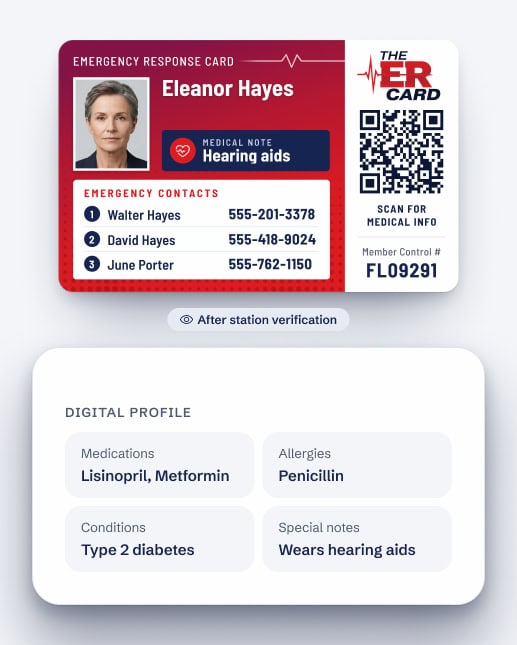
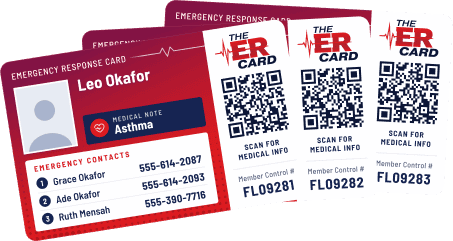
The ER Card pairs a physical card you carry, called the Red Card, with a digital emergency profile. Your card displays your identity, up to three emergency contacts and their phone numbers, and a brief medical note.
If you cannot answer questions during an emergency, a responder from a participating agency can scan your card and complete station verification to review the fuller medical and emergency information you choose to share, such as medications, allergies, medical conditions, and special notes.
Keep your profile current yourself, or ask a trusted family member or caregiver to help.

Medical Information for Life at Home and on the Go
Whether you are at home, running errands, or visiting family, the person who knows your medications, allergies, or other needs may not be beside you. Preparing selected medical and emergency information gives participating responders a place to review details you may be unable to explain.

Make selected medical details available
Medications, allergies, and medical conditions can be difficult to recall under stress. Choose which details to include in your digital profile so a verified responder can review them if you cannot answer questions.

Make selected medical details available
Medications, allergies, and medical conditions can be difficult to recall under stress. Choose which details to include in your digital profile so a verified responder can review them if you cannot answer questions.

Make selected medical details available
Medications, allergies, and medical conditions can be difficult to recall under stress. Choose which details to include in your digital profile so a verified responder can review them if you cannot answer questions.
How The ER Card Works for Seniors

Prepare your emergency information
Join The ER Card and add your identity, photo, and emergency contacts. Choose the medical details and emergency notes you want to share. A trusted family member or caregiver can help you get started.

Prepare your emergency information
Join The ER Card and add your identity, photo, and emergency contacts. Choose the medical details and emergency notes you want to share. A trusted family member or caregiver can help you get started.

Prepare your emergency information
Join The ER Card and add your identity, photo, and emergency contacts. Choose the medical details and emergency notes you want to share. A trusted family member or caregiver can help you get started.
When a responder finds your card
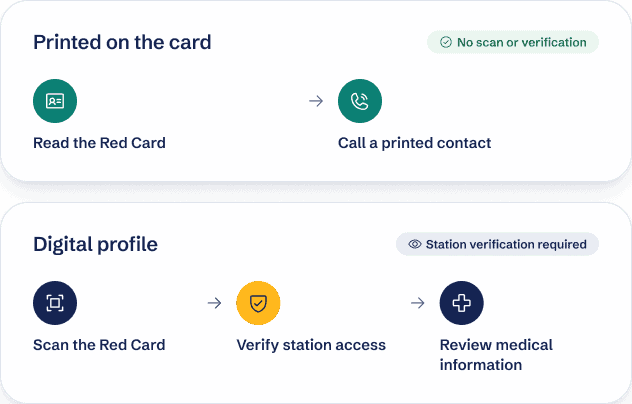
Your printed contact numbers and brief medical note are available as soon as someone reads the card. A responder can use those numbers to call a contact without scanning or completing station verification.
To review your fuller medical information, a responder from a participating agency scans the QR code and completes station verification, the agency access check required before viewing your digital profile. The responder can then review the medications, allergies, conditions, and special notes you have provided. Scanning alone does not open the profile.
What Is Printed on Your Card and What Is in Your Digital Profile
Your Red Card provides information someone can read directly, while your digital profile holds the fuller medical and emergency details you choose to share through verified responder access.
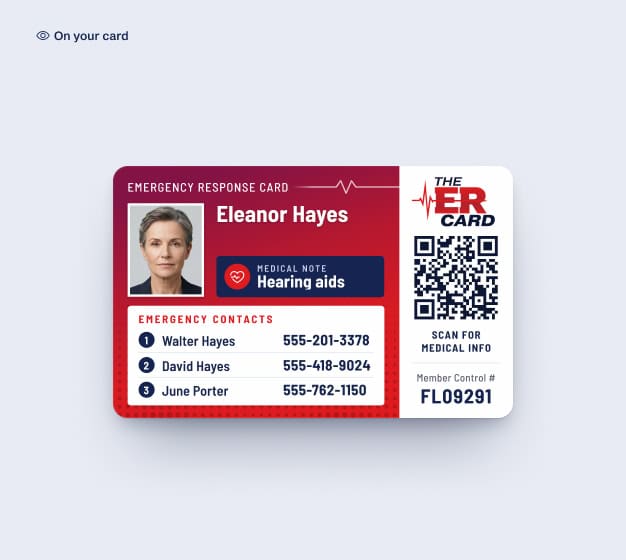
Information visible on the physical card
Your name, photo, up to three emergency contacts and their phone numbers, and a brief medical note are printed on the card. Anyone holding the card can read these details. No scanning, login, or station verification is needed to read them or call a printed contact number.
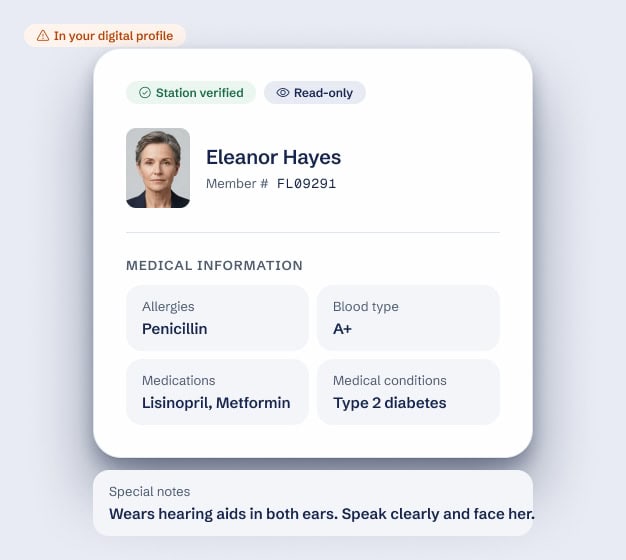
Fuller medical information in your digital profile
You can include medications, allergies, blood type, medical conditions, and special emergency notes in your digital profile. These details allow more information than the brief note printed on the card. Include only the voluntary information you choose to share.

Voluntary emergency details
You can choose to include blood type, allergies, medications, medical conditions, and special emergency notes. These details may help explain needs or circumstances you would otherwise have to communicate yourself.
Explore Membership for Yourself or Someone You Care For
Review membership options and eligibility before enrolling. Whether you are preparing for yourself or helping someone else, organize the medical information you want available through verified access and the emergency contacts printed on that person’s card.
Helping a Parent or Someone You Care For?
Preparing emergency information can be something you do together. With their permission, you can help create and maintain their profile, organize the medical details they want to share, and check the emergency contact numbers for their card.


Start with their choices
Talk about whom they would want contacted and which voluntary details they want included. Being an emergency contact and helping maintain a profile are different roles; the senior may choose different people for each.

Review changes together
Help check the digital profile when medications or contact details change. Also review the information printed on the card. Keep both specific to that person and consistent with what they want to share.

Make carrying the card part of the routine
Help them keep their Red Card with their everyday belongings. Someone who finds it can read the printed contacts and brief medical note. A responder from a participating agency can use the card to access the fuller digital profile after station verification.
Why Seniors and Families Choose The ER Card
Questions About The ER Card for Seniors
No. The identity and emergency contacts printed on your card can be useful even if you live with someone and have no medical condition to list. Medical details are voluntary. Review Membership for available options and eligibility.
Prepare Your Emergency Information Before You Need It
Prepare the medical and emergency information you choose to share, keep your printed contacts accurate, and carry your Red Card as part of your everyday routine. Explore membership for yourself or someone you are helping prepare.
 Already a member? Review your digital profile and check the information printed on your card. View Membership